
🎨
Visual Workflow Builder
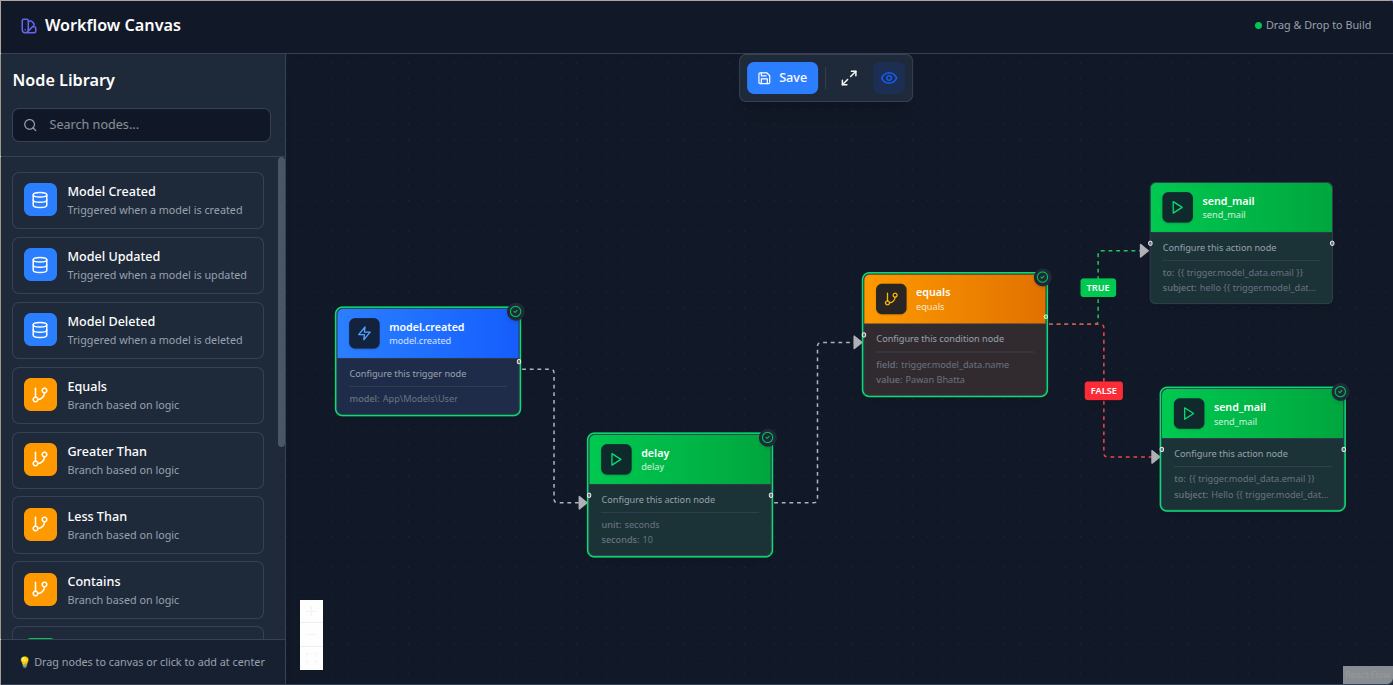
Intuitive drag-and-drop interface powered by React Flow. Build complex workflows visually without writing a single line of code.
Build powerful, visual workflows for Laravel with an intuitive drag-and-drop canvas editor. Automate complex business processes without writing code.
WorkflowStudio brings enterprise-grade workflow automation to Laravel applications. Whether you're building user onboarding flows, automated notifications, data processing pipelines, or complex business logic, WorkflowStudio provides the tools you need.
Get started in minutes. Install the package, configure your models, and start building workflows immediately. No complex setup required.
See your workflows as you build them. The visual canvas makes it easy to understand complex automation logic at a glance.
Built for Laravel with queue support, error handling, and comprehensive logging. Trusted by developers building mission-critical applications.
Monitor workflow executions in real-time. View execution history, debug failures, and track performance metrics.
Test workflows instantly without creating test data. The manual execution feature lets you test any workflow with custom test data right from the editor.
Get up and running in just a few commands:
# Install the package
composer require workflowstudio/workflowstudio

# Publish configuration and assets
php artisan vendor:publish --provider="WorkflowStudio\WorkflowStudioServiceProvider"

# Run migrations
php artisan migrate
That's it! Visit /workflowstudio/workflows to start building your first workflow.
See WorkflowStudio in action with our intuitive drag-and-drop interface:
Automate welcome emails, profile setup, and account activation workflows when new users register.
Trigger order confirmations, inventory updates, shipping notifications, and customer follow-ups.
Process uploaded files, transform data, sync with external services, and generate reports automatically.
Send alerts, reminders, and updates based on system events, user actions, or scheduled triggers.
Connect with third-party APIs, webhooks, and services without writing custom integration code.